The range notebook for a whole squad

Shoot clean.

Standing 5/5 0:17.0

Every shot on the target, every session in the diary, every athlete in one place. Built for biathlon coaches and the athletes they work with.

Free for up to 3 athletes. Try it without an account. Coaches, there is a web platform too.

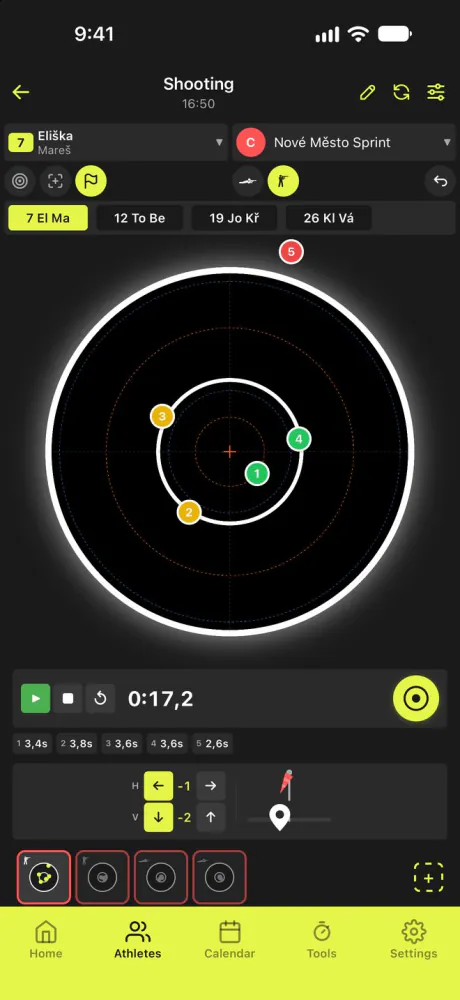
Tap the target to place each shot, or use the five-plate board when you only saw them fall. Prone and standing stay apart in every number.

Tap a target to see that shot.

The shooting screen: a target with five placed shots and a split timer.

Try it

Place five shots.

Tap where each one landed, exactly as you would in the app. The numbers come from the same formulas.

Shot 1 of 5

Group size
–
Group centre
–
Sight correction
–
Rhythm
–

Correction at 4.5 mm per click.

Log the real ones

Do the maths

What does a miss cost?

Tap the shots that missed, set your own times, and see what really decides the race.

2:00 spent on shooting and penalties

Range 1:10Penalty loops 0:50

One miss fewer

25 s saved

5 s faster at each stage

10 s saved

Keep the real numbers in the app

The whole season,
in one notebook.

May and June · Preparation

Training

  • A diary the athlete fills in and the coach actually reads
  • Training plans by week and by session, on the athlete's own phone
  • Readiness from sleep, resting heart rate and how they say they feel
Training diary

July · Preparation

Drills

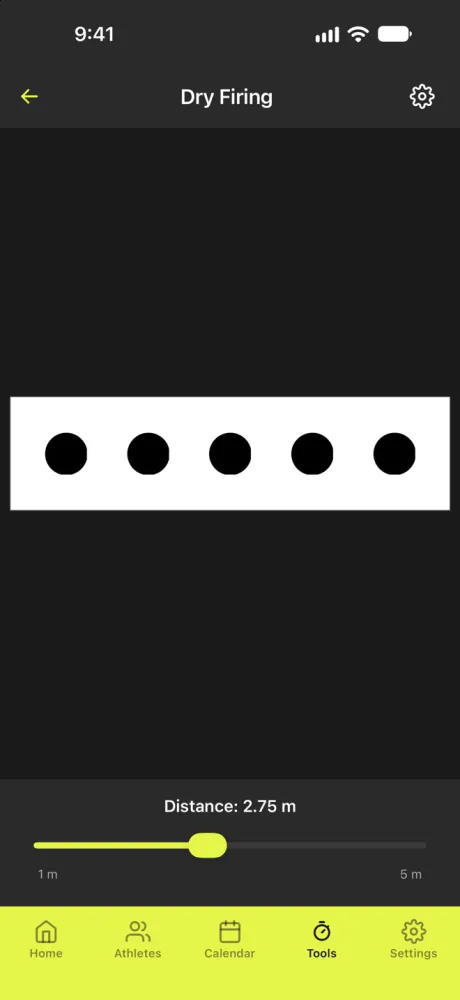
  • Dry firing without ammunition: the real board scaled from 1 to 5 m, with a metronome
  • Eye tracking with moving targets
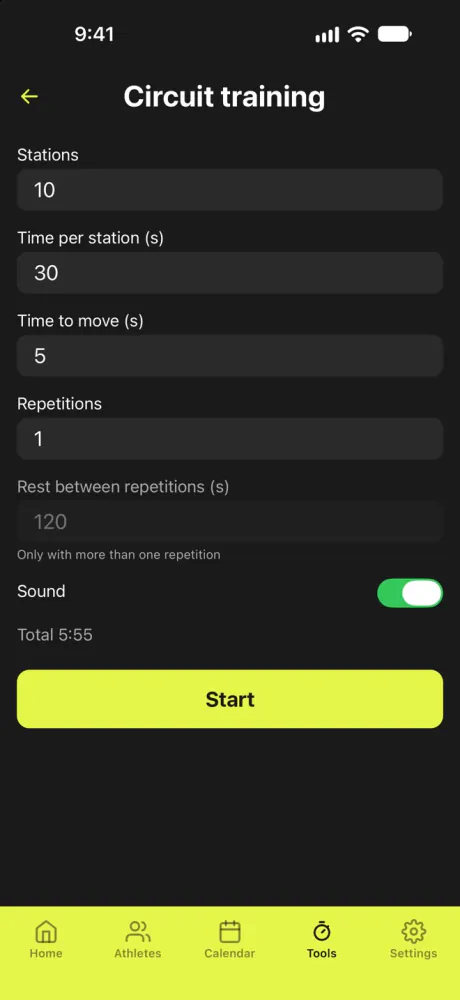
  • Circuit training: stations, moves and repetitions with a 3-2-1 beep
  • A training clock with interval beeps
Dry firing with the biathlon board at 2.75 m Circuit training: stations, time per station and repetitions

August and September · Build

On the range

  • Split times per shot: the mount, then the rhythm that follows
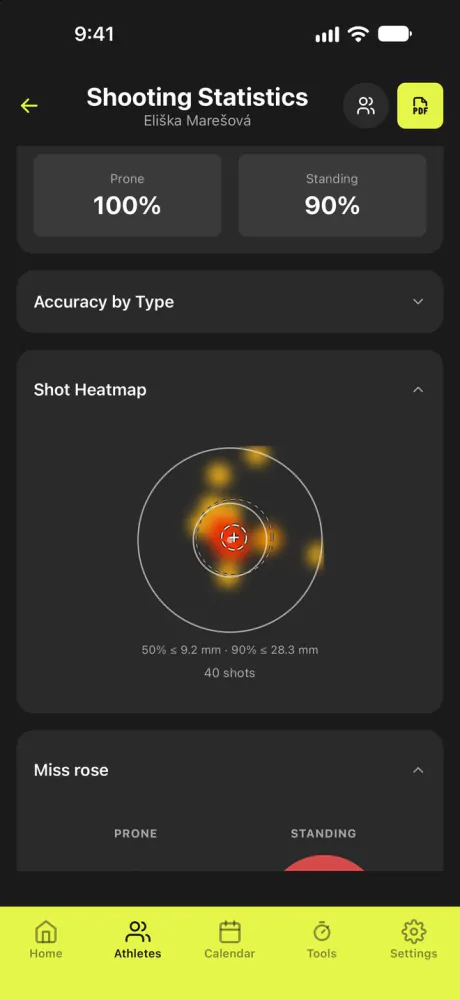
  • Group size, mean point of impact and a shot heatmap
  • A zeroing grid and a record of every sight correction
Shot heatmap

October · First snow

Ski service Beta

  • Log each waxing layer by layer, for one pair or several at once
  • A wax box with temperature ranges, stock and box-code scanning
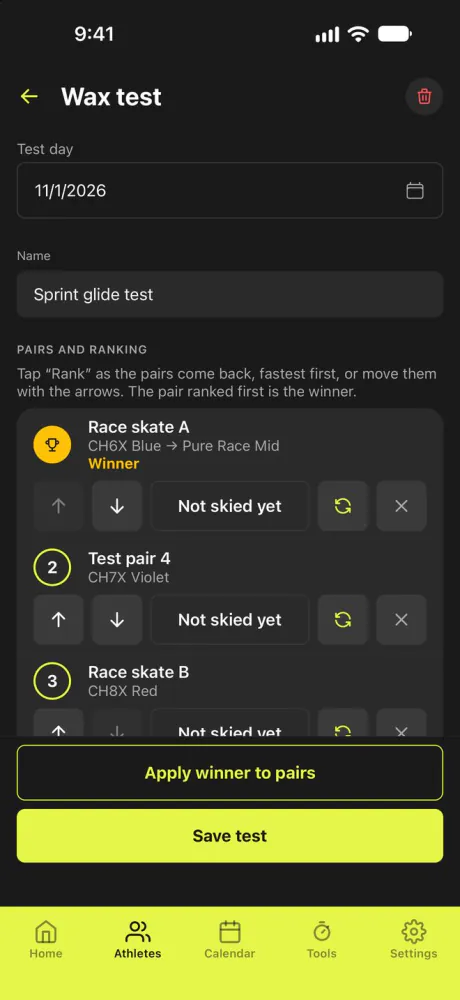
  • Wax tests: rank the pairs, then apply the winner to the race skis
Wax test ranking

November and December · Race season

The squad

  • Athlete profiles, teams and events with a start list
  • Share an athlete with an assistant coach, view-only or with edit rights
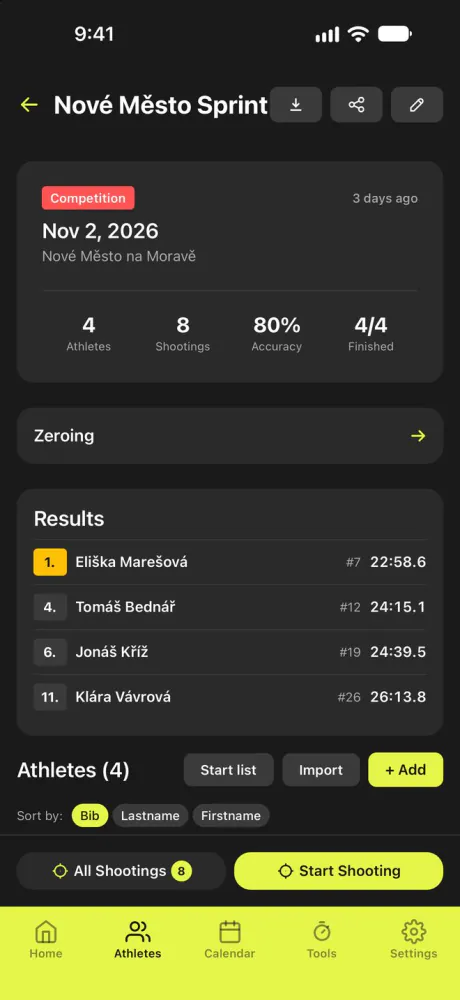
  • Race results on the roster: bib, start time, race time, rank
Race event with a start list

January to March · Race season

At the venue

  • A venue screen that shows where the athlete is on the loop
  • A Bluetooth LED panel with the clock, a countdown, distance and pace
  • A stopwatch with laps, and video review down to 1/64 speed

April · Transition

Look back

  • Shooting statistics by stance, session type and shot position
  • Athletes side by side, in shooting and in training
  • Earlier seasons stay on the web platform's season board
Shooting statistics for one athlete

No signal needed.

Everything stays on the phone and syncs when you are back.

All features

Inside the app

Drag to browse. Tap a screen to see what it can do.
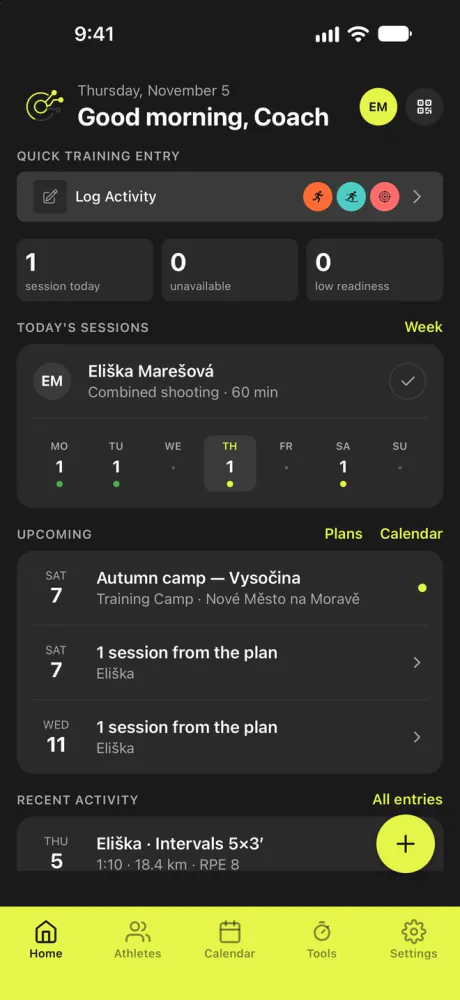
Coach home screen

Coach home

Your morning in one look.

  • Log a session in a few taps
  • Today's sessions and the week ahead
  • Who is unavailable, who has low readiness
  • Upcoming events and plan sessions

Tap to flip back

Coach home
Shooting screen with a target and splits

Shooting

Log it as it happens.

  • Tap the target or use the five-plate board
  • A split time for every shot
  • Switch between athletes by bib
  • A sight correction in clicks

Tap to flip back

Shooting
Shot heatmap in shooting statistics

Shot heatmap

See where shots really go.

  • A heatmap of every shot in the period
  • Prone and standing accuracy, kept apart
  • The circles that hold 50 % and 90 % of shots
  • A miss rose that shows the direction

Tap to flip back

Shot heatmap
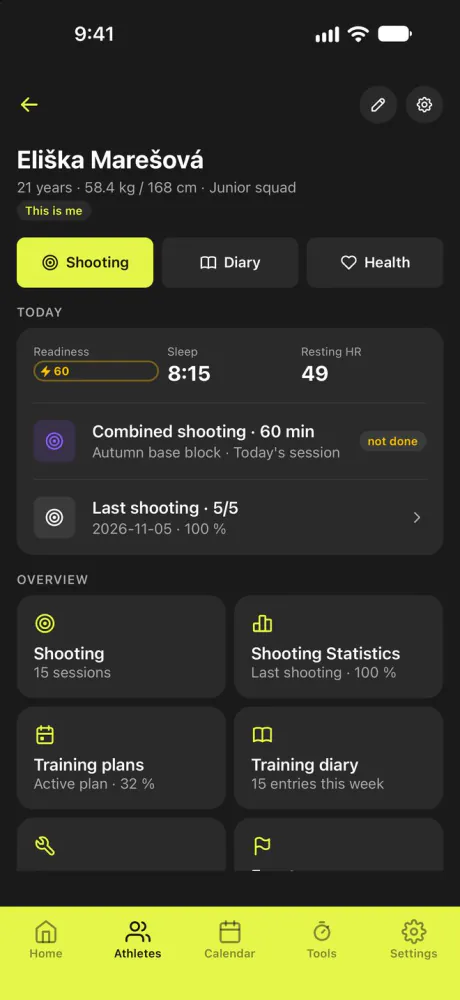
Athlete detail screen

Athlete

One athlete, one page.

  • Readiness, sleep and resting heart rate
  • Today's session and the last shooting
  • Shooting, diary and health on separate tabs
  • Statistics and plans one tap away

Tap to flip back

Athlete
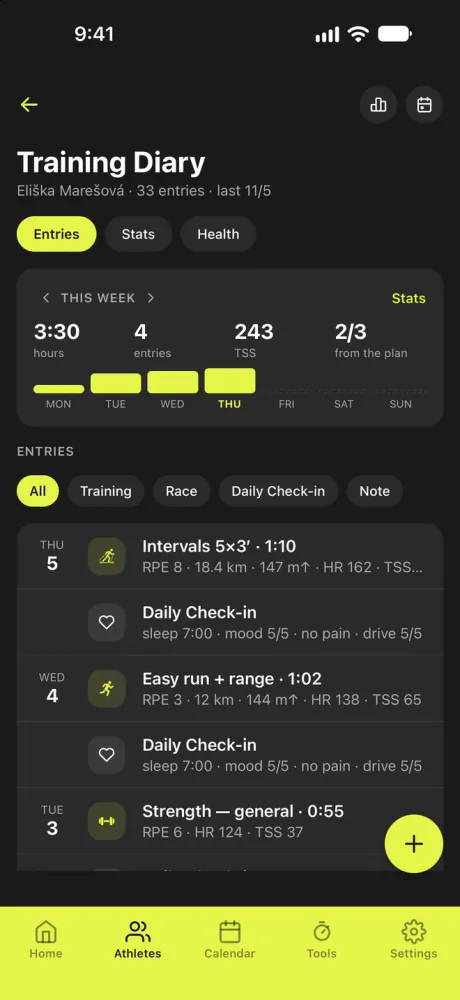
Athlete training diary

Training diary

A diary coaches actually read.

  • Hours, entries and TSS for the week
  • How much of the plan got done
  • Every entry with its RPE and duration
  • Filter by training, race or note

Tap to flip back

Training diary
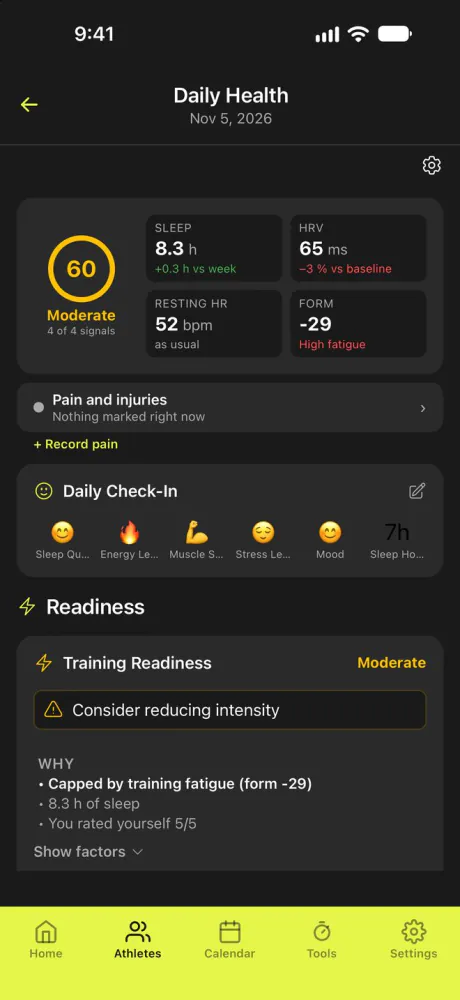
Daily health screen

Daily health

Know how they feel today.

  • A readiness score from four signals: sleep, HRV, resting heart rate and form
  • A quick morning check-in
  • It says why, not just how much
  • Record pain and injuries

Tap to flip back

Daily health
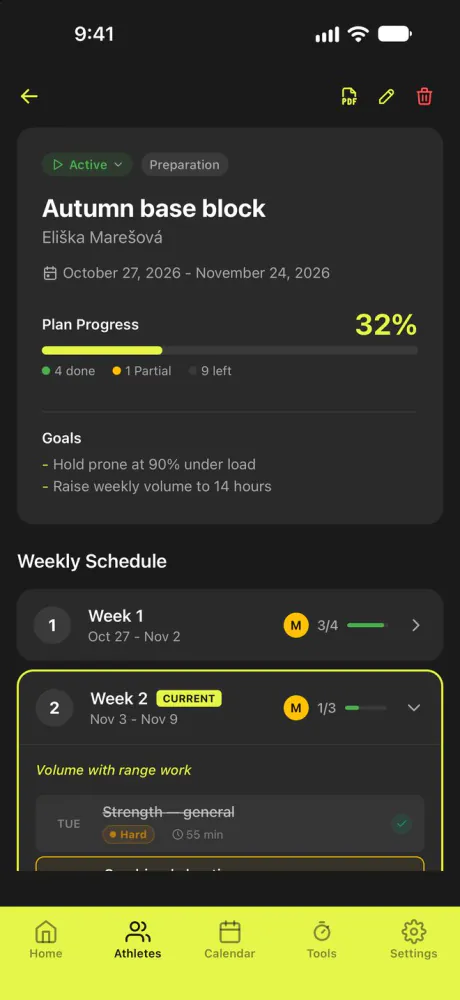
Training plan detail

Training plan

The plan, week by week.

  • Goals and a weekly schedule
  • Progress: done, partial and left
  • The current week stands out
  • Followed on the athlete's own phone

Tap to flip back

Training plan
Race event detail

Race event

The whole race on one screen.

  • Results with rank, bib and race time
  • Shootings and accuracy for the team
  • A start list you can import
  • Start shooting straight from the event

Tap to flip back

Race event
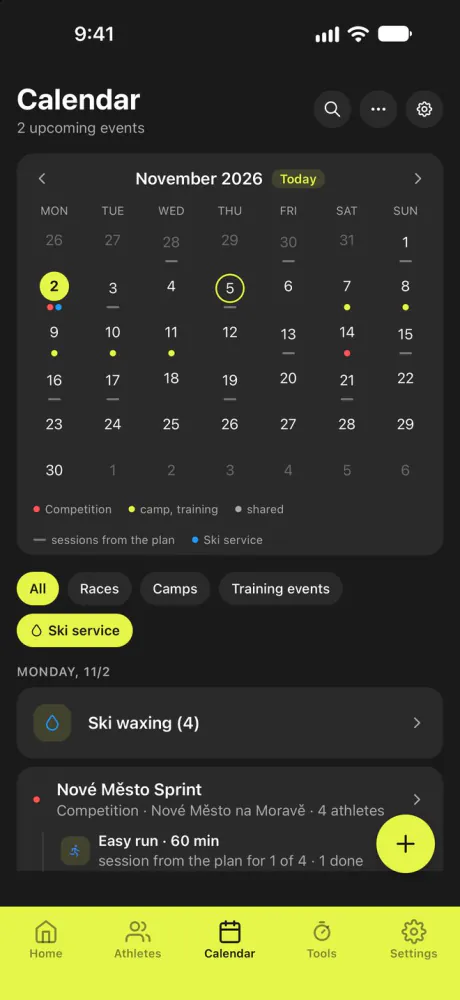
Calendar day view

Calendar

The whole season on a calendar.

  • Races, camps and training events
  • Sessions from the plan
  • Waxing days, tied to the race
  • Filter by what you need to see

Tap to flip back

Calendar
Wax test ranking

Wax test Beta

Find the fastest pair.

  • Rank the pairs as they come back
  • The winner is marked with its recipe
  • Apply the winner to the race skis

Tap to flip back

Wax test Beta

Back at the desk.

The same account and the same athletes on a bigger screen. Coaches sign in on the web to read the squad, plan ahead and handle the paperwork.

Who needs attention today, how this week's plan is going and which races come next.

  • Season board and training plans
  • Start lists and race PDFs
  • Equipment import and QR labels
  • Exports for the whole squad
Open the web platform

Some tools need Premium. Recording at the range, and working without signal, stay in the app.
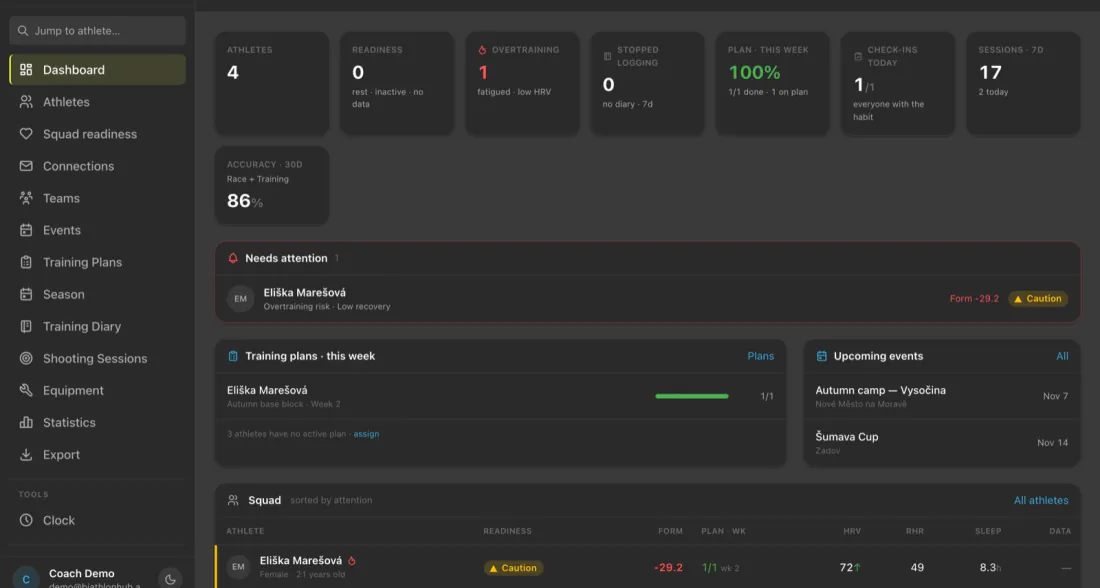
BiathlonHub web platform: the coach dashboard with the squad, this week's plans and upcoming events

One app, three ways to work.

    Premium is needed only by the person who shares.

    Sped up for the demo. In the app a shot arrives with the next sync.

    Start free. Grow with the squad.

    Free

    €0

    For as long as you like.

    • Up to 3 athletes
    • Unlimited shooting sessions, and full use offline
    • Events, training diary and basic statistics
    • Try the app without an account

    Premium

    €20 a year

    Or 500 Kč a year. Try it free for 14 days, no payment details needed.

    • Unlimited athletes
    • Advanced statistics and trends
    • Share athletes and events with other coaches
    • Equipment, rifle service records and round counts
    • PDF exports
    • Priority support

    Questions

    Does it work without signal?

    Yes. Everything stays on the phone and syncs when you are back.

    Is it free?

    Yes, for up to 3 athletes, with unlimited shooting sessions and full use offline. Premium adds unlimited athletes, advanced statistics, equipment records and PDF exports. Premium costs €20 or 500 Kč a year, and you can try it free for 14 days.

    Do I need an account?

    No. You can try the app without an account.

    Which devices does it run on?

    iPhone, iPad and Android, plus a web platform for coaches.

    Is there a web version?

    Yes. Coaches sign in at platform.biathlonhub.com with the same account and see the same athletes. Some tools need Premium.

    Can an assistant coach see my athletes?

    Yes, if you share them. Each athlete can be shared view-only or with edit rights.

    Is ski service finished?

    It is in beta. Layered waxing, the wax box, recipes and wax tests all work, and we are still improving them.

    Which languages does it speak?

    English, Czech, German, Polish, French, Norwegian and Swedish.

    Five shots.
    One notebook.

    Or open the web platform